
Sales Portal
Bulk Import & Export Clients in Sunhub Sales Portal | Manage Client Lists Instantly
Managing large client lists manually can slow down sales operations. With Sunhub’s Sales Portal, sales teams can now import and export client listings in bulk, making it easier to organize contacts, onboard new customers, and maintain accurate client data. In this tutorial, you’ll learn how to: • Export your client list using the portal template • Import client records in bulk • Upload client data using the correct format • Validate required fields automatically • Edit and update client information from the dashboard This feature helps sales teams save time, reduce manual work, and keep client records organized inside the Sales Portal.
8 September 2026Related Videos
 0:56
0:56Send Exclusive Deals to Multiple Customers | Smarter Deal Management in Sunhub Portal
Learn how to send exclusive deals to multiple customers at once using the Sunhub Portal. This tutorial walks you through the simple steps of selecting offers, adding multiple clients, and sending professional deal communications directly through the platform.
 2:03
2:03Connect Your Sales Portal to Sunhub Marketplace | Turn Inventory Into Live Deals
Your inventory shouldn’t stay hidden.
In this tutorial, we show how to connect your Sales Portal with the Sunhub Marketplace and bring your products directly to a broader solar buyer network.
 2:08
2:08Create Private Landing Pages in Sunhub | Show the Right Deals
Sharing your full inventory isn’t always the best way to engage customers.
With Sunhub’s Landing Pages feature, you can create focused, branded pages that highlight the right deals for the right audience — helping you present your offers more effectively and improve customer engagement.
In this tutorial, you’ll learn how to:
• Create a private landing page
• Select and showcase targeted deals
• Choose layouts like card, table, or list view
• Add branding with banners and logos
• Share landing pages directly with your clients
This feature helps suppliers present deals in a more structured and professional way, making it easier for customers to explore and take action.
 1:30
1:30From Deal to Invoice | Sunhub Sales Portal
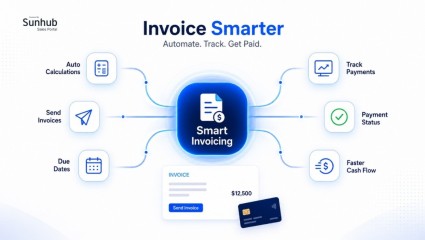
Smart Invoicing for solar sales helps teams create, send, and track professional invoices from one place inside Sunhub’s Sales Portal.
Explore the Sales Portal or book a discovery call:
https://www.sunhub.com/sales-portal
Turn approved deals into accurate invoices without moving between disconnected tools. Smart Invoicing automates calculations, generates unique invoice numbers, supports Stripe and wire transfer payment details, tracks invoice status, and keeps your sales-to-cash process organized.
Built for solar suppliers, distributors, brokers, and sales teams, Smart Invoicing allows you to:
• Create invoices from existing sales deals
• Add client details, PO references, invoice dates, and due dates
• Set payment terms and payment methods
• Adjust product quantities and pricing
• Add logistics, warehousing, and custom service charges
• Include Stripe payment links and invoice notes
• Track invoice status and payment activity
• Edit, email, print, or download invoices as PDFs
• View and manage previous invoices from one place
 1:16
1:16The Smart Solar Sales Portal – Sell Faster & Smarter on Sunhub
Discover how the Smart Solar Sales Portal on Sunhub helps installers and distributors sell faster and smarter. Explore powerful tools, automated workflows, and a seamless buying experience designed to boost your solar business.
 2:02
2:02How to Add a New Sales Team Member On Sunhub's New Portal - Company Operations Just Leveled Up
In this detailed tutorial, learn how to add a new sales team member to your Sunhub Sales Portal. This step-by-step guide will walk you through the process from logging in as a manager, filling out team member details, to sending the invite for password setup.
 3:18
3:18How to Create a Private Deal for a Customer in Sunhub's New Portal Like a Pro
Welcome to Sunhub Sales Portal Tutorials! In this video, we'll guide you through the process of creating a private deal for your customer. From logging in and selecting the right options, to adding product details and updating pricing information,
 1:29
1:29A Complete Guide to Sending Quotes on Sunhub's Portal
This comprehensive tutorial guides you through every step of sending a professional sales quote. Learn how to log in, fill in essential details like subject, quantity, and expiry, and send your quote with ease.
 1:06
1:06How to Send an Offer on Sunhub Sales Portal | Step-by-Step Guide
Learn how to send offers quickly and efficiently on Sunhub’s Sales Portal with this easy, step-by-step tutorial. Whether you’re a seller, distributor, or solar professional, this guide will help you navigate the platform and send deals to clients with confidence.
 3:17
3:17Negotiating on Sunhub’s Sales Portal (Step-by-Step)
Speed up your negotiations on Sunhub? Learn how to submit and negotiate offers using chat to collaborate with sales teams accepting, declining, or updating offers finalizing contracts instantly
 1:40
1:40How to Update and Duplicate Deals in the Sunhub Portal | Easy Walkthrough
In this tutorial, we show how to duplicate existing deals, update pricing, and send them to multiple customers — all using the portal’s intuitive features.
0:56Send Exclusive Deals to Multiple Customers | Smarter Deal Management in Sunhub Portal
Learn how to send exclusive deals to multiple customers at once using the Sunhub Portal. This tutorial walks you through the simple steps of selecting offers, adding multiple clients, and sending professional deal communications directly through the platform.
2:03Connect Your Sales Portal to Sunhub Marketplace | Turn Inventory Into Live Deals
Your inventory shouldn’t stay hidden.
In this tutorial, we show how to connect your Sales Portal with the Sunhub Marketplace and bring your products directly to a broader solar buyer network.
2:08Create Private Landing Pages in Sunhub | Show the Right Deals
Sharing your full inventory isn’t always the best way to engage customers.
With Sunhub’s Landing Pages feature, you can create focused, branded pages that highlight the right deals for the right audience — helping you present your offers more effectively and improve customer engagement.
In this tutorial, you’ll learn how to:
• Create a private landing page
• Select and showcase targeted deals
• Choose layouts like card, table, or list view
• Add branding with banners and logos
• Share landing pages directly with your clients
This feature helps suppliers present deals in a more structured and professional way, making it easier for customers to explore and take action.
1:30From Deal to Invoice | Sunhub Sales Portal
Smart Invoicing for solar sales helps teams create, send, and track professional invoices from one place inside Sunhub’s Sales Portal.
Explore the Sales Portal or book a discovery call:
https://www.sunhub.com/sales-portal
Turn approved deals into accurate invoices without moving between disconnected tools. Smart Invoicing automates calculations, generates unique invoice numbers, supports Stripe and wire transfer payment details, tracks invoice status, and keeps your sales-to-cash process organized.
Built for solar suppliers, distributors, brokers, and sales teams, Smart Invoicing allows you to:
• Create invoices from existing sales deals
• Add client details, PO references, invoice dates, and due dates
• Set payment terms and payment methods
• Adjust product quantities and pricing
• Add logistics, warehousing, and custom service charges
• Include Stripe payment links and invoice notes
• Track invoice status and payment activity
• Edit, email, print, or download invoices as PDFs
• View and manage previous invoices from one place
1:16The Smart Solar Sales Portal – Sell Faster & Smarter on Sunhub
Discover how the Smart Solar Sales Portal on Sunhub helps installers and distributors sell faster and smarter. Explore powerful tools, automated workflows, and a seamless buying experience designed to boost your solar business.
2:02How to Add a New Sales Team Member On Sunhub's New Portal - Company Operations Just Leveled Up
In this detailed tutorial, learn how to add a new sales team member to your Sunhub Sales Portal. This step-by-step guide will walk you through the process from logging in as a manager, filling out team member details, to sending the invite for password setup.
3:18How to Create a Private Deal for a Customer in Sunhub's New Portal Like a Pro
Welcome to Sunhub Sales Portal Tutorials! In this video, we'll guide you through the process of creating a private deal for your customer. From logging in and selecting the right options, to adding product details and updating pricing information,
1:29A Complete Guide to Sending Quotes on Sunhub's Portal
This comprehensive tutorial guides you through every step of sending a professional sales quote. Learn how to log in, fill in essential details like subject, quantity, and expiry, and send your quote with ease.
1:06How to Send an Offer on Sunhub Sales Portal | Step-by-Step Guide
Learn how to send offers quickly and efficiently on Sunhub’s Sales Portal with this easy, step-by-step tutorial. Whether you’re a seller, distributor, or solar professional, this guide will help you navigate the platform and send deals to clients with confidence.
3:17Negotiating on Sunhub’s Sales Portal (Step-by-Step)
Speed up your negotiations on Sunhub? Learn how to submit and negotiate offers using chat to collaborate with sales teams accepting, declining, or updating offers finalizing contracts instantly
1:40How to Update and Duplicate Deals in the Sunhub Portal | Easy Walkthrough
In this tutorial, we show how to duplicate existing deals, update pricing, and send them to multiple customers — all using the portal’s intuitive features.
0:56Send Exclusive Deals to Multiple Customers | Smarter Deal Management in Sunhub Portal
Learn how to send exclusive deals to multiple customers at once using the Sunhub Portal. This tutorial walks you through the simple steps of selecting offers, adding multiple clients, and sending professional deal communications directly through the platform.
2:03Connect Your Sales Portal to Sunhub Marketplace | Turn Inventory Into Live Deals
Your inventory shouldn’t stay hidden.
In this tutorial, we show how to connect your Sales Portal with the Sunhub Marketplace and bring your products directly to a broader solar buyer network.
2:08Create Private Landing Pages in Sunhub | Show the Right Deals
Sharing your full inventory isn’t always the best way to engage customers.
With Sunhub’s Landing Pages feature, you can create focused, branded pages that highlight the right deals for the right audience — helping you present your offers more effectively and improve customer engagement.
In this tutorial, you’ll learn how to:
• Create a private landing page
• Select and showcase targeted deals
• Choose layouts like card, table, or list view
• Add branding with banners and logos
• Share landing pages directly with your clients
This feature helps suppliers present deals in a more structured and professional way, making it easier for customers to explore and take action.
1:30From Deal to Invoice | Sunhub Sales Portal
Smart Invoicing for solar sales helps teams create, send, and track professional invoices from one place inside Sunhub’s Sales Portal.
Explore the Sales Portal or book a discovery call:
https://www.sunhub.com/sales-portal
Turn approved deals into accurate invoices without moving between disconnected tools. Smart Invoicing automates calculations, generates unique invoice numbers, supports Stripe and wire transfer payment details, tracks invoice status, and keeps your sales-to-cash process organized.
Built for solar suppliers, distributors, brokers, and sales teams, Smart Invoicing allows you to:
• Create invoices from existing sales deals
• Add client details, PO references, invoice dates, and due dates
• Set payment terms and payment methods
• Adjust product quantities and pricing
• Add logistics, warehousing, and custom service charges
• Include Stripe payment links and invoice notes
• Track invoice status and payment activity
• Edit, email, print, or download invoices as PDFs
• View and manage previous invoices from one place